Android Kitkat review
27/11/2013USB OTG cable for your Android device – UPDATED
06/12/2013Something has been driving me mad with a WordPress website I am creating. I have all of the menu items in capitals but the “HOME” menu item is stuck in lower case. Now, ‘Home’ isn’t the name of any page on the site but WordPress knows what page I want to use as the home page. That page’s title is something totally different and quite long for SEO reasons.
 I use the Weaver II theme on the website and I have looked everywhere in the settings for a means of changing this but there is nothing! A Google search reveals that quite a lot of people are having the same issue. You would think a CMS as powerful as WordPress would have this option with a tickbox. The only way to achieve this seemingly simple aim is to edit a css style sheet. But, editing those is not recommended because your changes will be erased whenever the theme is updated.
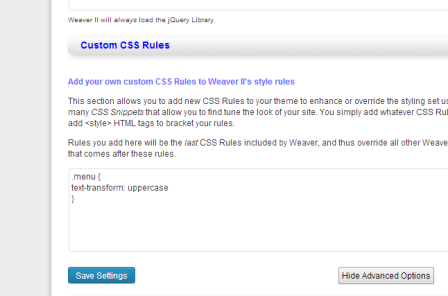
Here is the solution in the Weaver II theme to capitalise Home on WordPress menu bar.
Go to your WordPress dashboard and then Appearance / Weaver II admin / Advanced Options / <Head> Section.
Copy this code into the ‘Custom css rules’ text box
.menu {
text-transform: uppercase
}
Save the settings and refresh a page. That’s it!
Do you know of an easier way? I’d love to know.